Tableau ? AI-Powered Business Intelligence and Data Visualization Platform
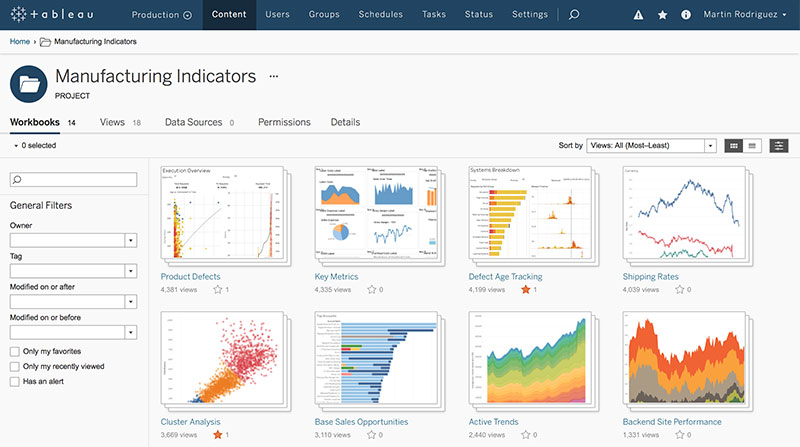
Tableau is a leading business intelligence (BI) and data visualization platform that empowers users to analyze, visualize, and share data insights through interactive dashboards. Renowned for its intuitive drag-and-drop interface and robust analytics capabilities, Tableau enables organizations to make data-driven decisions efficiently.
What Is Tableau?
Tableau offers a comprehensive suite of tools designed to transform raw data into actionable insights. By connecting to various data sources, users can create dynamic visualizations and dashboards that facilitate deeper understanding and informed decision-making. Tableau’s integration with AI and machine learning enhances its analytical prowess, making it a preferred choice for businesses across industries.
Key Features
1. Interactive Dashboards
- Create real-time, interactive dashboards that allow users to explore data through filters, drill-downs, and visual cues.
2. Data Connectivity
- Connect seamlessly to a wide range of data sources, including spreadsheets, databases, cloud services, and big data platforms.
3. AI-Powered Analytics
- Utilize AI features like “Explain Data” to automatically generate explanations for data points, aiding in uncovering insights.
4. Data Preparation
- Leverage Tableau Prep Builder to clean, shape, and combine data for analysis, ensuring data quality and consistency.
5. Geospatial Analysis
- Incorporate geographic data into analyses, creating maps and spatial visualizations to identify location-based trends.
6. Collaboration and Sharing
- Share dashboards and reports securely across teams and departments, fostering a collaborative data culture.
Who Is It For?
- Data Analysts: Seeking advanced tools for in-depth data analysis and visualization.
- Business Users: Looking to explore data insights without extensive technical expertise.
- Executives and Decision-Makers: Requiring real-time dashboards to monitor key performance indicators (KPIs).
- IT and Data Teams: Managing data governance, security, and infrastructure for analytics.
Benefits of Using Tableau
- Enhanced Decision-Making: Facilitates informed decisions through clear data visualizations and insights.
- User-Friendly Interface: Allows users of varying technical backgrounds to create and interpret dashboards.
- Scalability: Supports organizations of all sizes, from small businesses to large enterprises.
- Integration Capabilities: Works well with existing data infrastructure and tools.
- Community and Support: Access to a vast community of users and extensive learning resources.
Pricing Overview
Tableau offers several pricing tiers to accommodate different user roles and organizational needs:
- Creator: Designed for users who need full access to all Tableau features, including data preparation and dashboard creation.
- Includes Tableau Desktop, Tableau Prep Builder, and one Creator license on Tableau Cloud or Server.
- Priced at $70 per user per month, billed annually.
- Explorer: For users who need to explore and interact with data and dashboards without full data preparation capabilities.
- Includes one Explorer license on Tableau Cloud or Server.
- Priced at $42 per user per month, billed annually.
- Viewer: Intended for users who need to view and interact with dashboards and visualizations.
- Includes one Viewer license on Tableau Cloud or Server.
- Priced at $15 per user per month, billed annually.
FAQs
Q1: Can Tableau connect to my existing data sources?
Yes, Tableau supports connections to a wide array of data sources, including Excel, SQL databases, cloud services, and big data platforms.
Q2: Is Tableau suitable for users without technical backgrounds?
Absolutely. Tableau’s intuitive drag-and-drop interface allows non-technical users to create and interpret visualizations with ease.
Q3: Does Tableau offer real-time data analysis?
Yes, Tableau can provide real-time analytics by connecting to live data sources, ensuring up-to-date insights.
Q4: Can I share my Tableau dashboards with others?
Yes, Tableau allows for secure sharing of dashboards and visualizations within and outside your organization.
Q5: What is Tableau Prep Builder?
Tableau Prep Builder is a tool within Tableau that helps users clean, shape, and combine data for analysis, streamlining the data preparation process.










Reviews
Clear filtersThere are no reviews yet.