Microsoft Power BI ? AI-Enhanced Business Intelligence and Data Visualization Platform
Microsoft Power BI is a comprehensive business analytics tool designed to transform raw data into meaningful insights through interactive visualizations and reports. It caters to both individual users and large enterprises, facilitating data-driven decision-making across various organizational levels.
What Is Power BI?
Power BI is a suite of software services, applications, and connectors that work cohesively to convert disparate data sources into coherent, visually immersive, and interactive insights. Whether your data resides in an Excel spreadsheet or a collection of cloud-based and on-premises hybrid data warehouses, Power BI enables seamless connectivity to these sources, allowing users to visualize and share insights across their organization.
Key Features
1. Interactive Dashboards and Reports
- Create real-time dashboards and reports with drag-and-drop functionality.
- Utilize a wide array of visualizations, including charts, maps, and gauges.
2. Data Connectivity
- Connect to various data sources such as Excel, SQL Server, Azure, and web APIs.
- Combine data from multiple sources for comprehensive analysis.
3. AI-Powered Analytics
- Leverage built-in AI capabilities for data preparation, analysis, and visualization.
- Use natural language queries to explore data and generate insights.
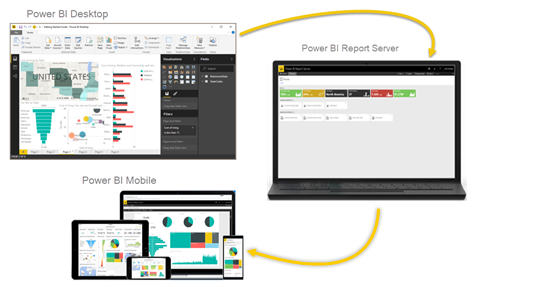
4. Mobile Accessibility
- Access and interact with dashboards and reports on iOS, Android, and Windows devices.
- Receive real-time alerts and notifications on the go.
5. Collaboration and Sharing
- Share reports and dashboards securely within and outside your organization.
- Collaborate with team members in real-time for enhanced decision-making.
Who Is It For?
- Business Analysts: For in-depth data analysis and reporting.
- Executives and Managers: To monitor key performance indicators and make informed decisions.
- IT Professionals: To manage data sources, security, and deployment.
- Developers: To embed analytics into custom applications.
- Small to Large Enterprises: For organization-wide data analytics and business intelligence needs.
Benefits of Using Power BI
- Enhanced Decision-Making: Provides actionable insights through interactive visualizations.
- User-Friendly Interface: Offers intuitive tools for users with varying technical expertise.
- Scalability: Accommodates growing data and user needs across organizations.
- Cost-Effective: Offers flexible pricing plans to suit different budgets.
- Integration: Seamlessly integrates with other Microsoft products and various data sources.
Pricing Overview
As of April 1, 2025, Microsoft Power BI offers the following pricing tiers:
- Power BI Pro: $14 per user per month
- Ideal for individuals and small teams requiring collaboration and sharing capabilities.
- Includes data governance, building dashboards, and publishing reports.
- Power BI Premium Per User (PPU): $24 per user per month
- Suitable for users needing advanced features like larger model sizes, paginated reports, and AI capabilities.
- Provides enhanced performance and data refresh rates.
- Power BI Premium (Capacity-Based): Custom pricing
- Designed for large organizations requiring dedicated cloud capacity.
- Enables widespread distribution of content without individual licenses.
FAQs
Q1: Can I use Power BI for free?
Yes, Power BI offers a free version called Power BI Desktop, which allows users to create reports and dashboards on their local machines.
Q2: What is the difference between Power BI Pro and Power BI Premium?
Power BI Pro is designed for individual users and small teams, offering collaboration and sharing features. Power BI Premium provides advanced capabilities, including larger data models, paginated reports, and dedicated cloud capacity, suitable for enterprise-level deployments.
Q3: Does Power BI support mobile devices?
Yes, Power BI has native mobile applications for iOS, Android, and Windows devices, enabling users to access and interact with their data on the go.
Q4: Can I share my Power BI reports with others?
Yes, with Power BI Pro or Premium licenses, users can share reports and dashboards securely within and outside their organization.
Q5: What data sources can Power BI connect to?
Power BI supports connections to a wide range of data sources, including Excel, SQL Server, Azure services, web APIs, and many others.










Reviews
Clear filtersThere are no reviews yet.