Parabola ? AI-Powered No-Code Data Workflow Automation
Parabola is an AI-driven, no-code platform designed to streamline and automate complex data workflows. Tailored for operations, logistics, finance, and IT teams, Parabola enables users to transform messy, unstructured data from various sources into organized, actionable insights without writing a single line of code.
What Is Parabola?
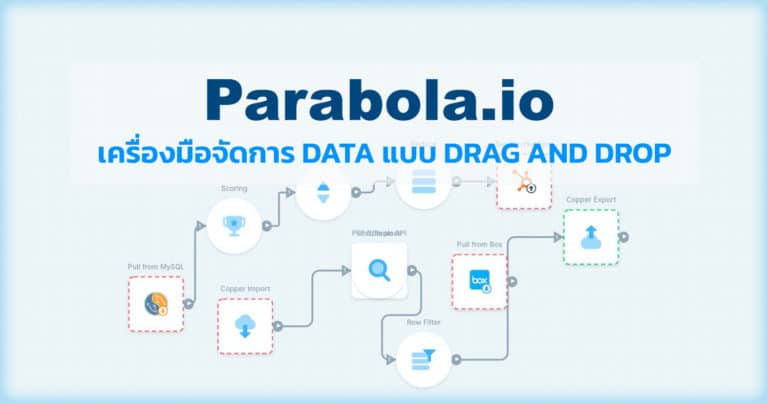
Parabola offers a visual workflow builder that allows users to create automated data processes by connecting steps in a flowchart-like interface. It excels at handling data from diverse sources such as PDFs, emails, spreadsheets, APIs, and databases. With built-in AI capabilities, Parabola can extract, transform, and analyze data, making it easier for teams to manage tasks like inventory reconciliation, invoice auditing, and supply chain optimization.
Key Features
1. Visual Workflow Builder
- Drag-and-drop interface for designing data workflows.
- Pre-built steps for common data operations like filtering, sorting, and merging.
2. AI Integration
- AI-powered steps for tasks such as data extraction, categorization, and summarization.
- Ability to process unstructured data from sources like PDFs and emails.
3. Extensive Data Connectivity
- Integrates with various data sources including Google Sheets, Excel, APIs, and databases.
- Supports importing and exporting data in multiple formats.
4. Automation Scheduling
- Schedule workflows to run at specific times or intervals.
- Automate repetitive tasks to improve efficiency.
5. Collaboration Tools
- Share workflows with team members.
- Manage user permissions and roles for secure collaboration.
Who Is It For?
- Operations Teams: Automate supply chain processes and data reconciliation.
- Finance Departments: Streamline financial reporting and invoice processing.
- Logistics Managers: Enhance shipment tracking and vendor compliance.
- IT Professionals: Integrate and manage data across various systems without coding.
- E-commerce Businesses: Manage product data, orders, and customer information efficiently.
Benefits of Using Parabola
- Efficiency: Reduces manual data handling, saving time and resources.
- Accuracy: Minimizes errors through automated data processing.
- Scalability: Handles growing data needs without additional technical overhead.
- Accessibility: Empowers non-technical users to build and manage workflows.
- Customization: Offers flexibility to tailor workflows to specific business needs.
Pricing Overview
Parabola offers several pricing plans to accommodate different user requirements:
- Basic Plan: Free
- Single user
- Up to 1,000 credits per month
- Access to AI steps and features
- Parabola visualizations
- Explorer Plan: $20/month (billed annually)
- Everything in Basic
- 1,500 credits per month
- 250MB of data storage
- Flow scheduling (up to daily)
- Self-guided onboarding materials
- Team Plan: $1,000/month (billed annually)
- Up to 10 users
- 100,000 credits per month
- Core collaboration features
- 5GB of data storage
- Dedicated onboarding support
- Support via email and Slack/Teams
- Advanced Plan: Custom pricing
- Everything in Team
- Unlimited users
- 420,000 credits per month
- Granular access permissions
- 50GB of data storage
- Usage analytics and reporting
- Dedicated account manager
- Service level agreements
- Enterprise Plan: Custom pricing
- Everything in Advanced
- Support for multiple instances
- Advanced admin permissions
- Auto-enrollment and domain capture
- Custom Parabola table storage
- Fully custom onboarding enablement
- On-demand live workflow building
- Live flow review and optimization
FAQs
Q1: Do I need coding experience to use Parabola?
No, Parabola is designed as a no-code platform, allowing users to build workflows through an intuitive drag-and-drop interface.
Q2: Can Parabola handle unstructured data like PDFs and emails?
Yes, Parabola can process unstructured data from sources such as PDFs, emails, and spreadsheets, transforming them into structured formats for analysis.
Q3: Is it possible to schedule workflows in Parabola?
Yes, Parabola allows users to schedule workflows to run at specific times or intervals, automating repetitive tasks.
Q4: What types of integrations does Parabola support?
Parabola integrates with various data sources, including Google Sheets, Excel, APIs, databases, and more, facilitating seamless data import and export.
Q5: Can multiple users collaborate on workflows in Parabola?
Yes, Parabola offers collaboration features that enable multiple users to work on workflows, with options to manage user permissions and roles.








Reviews
Clear filtersThere are no reviews yet.