





Midjourney: AI-Powered Image Generation from TextMidjourney is an advanced artificial intelligence that leverages natural language processing and image generation algorithms to create stunning illustrations. This innovative tool allows you to generate images from text prompts, making it perfect for artistic projects. It’s particularly appealing to marketing professionals and visual content creators looking for an easy way to generate high-quality images.
What is Midjourney?
One of the standout features of Midjourney is its ability to quickly and efficiently generate images without requiring any design skills or knowledge of complex software (like Photoshop). Simply describe the image you envision, and Midjourney takes care of the rest! It?s a great solution if you?re ever short on inspiration or looking for a fast and free way to create visuals.
However, keep in mind that, like any AI, there are limitations. The quality of the images depends on how accurately and clearly you describe your prompt. But the good news is that Midjourney is constantly improving through ongoing learning and updates.
How to Use Midjourney on Discord?
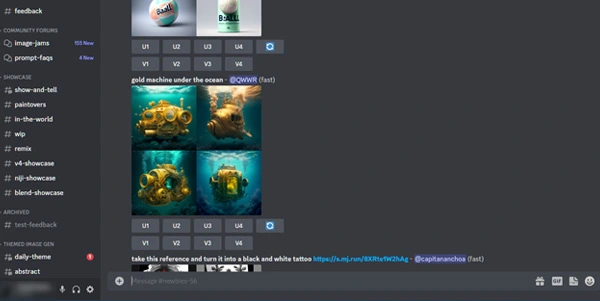
To get started with Midjourney, you?ll need to create an account and join the official Discord server. You can find the server link on the Midjourney homepage ? just click the ?Join the Beta? button. Once you’re in, use the command /imagine to generate your images. For example, if you want a 4K realistic image of a cosmonaut cat, type /imagine 4K realist cosmonaut cat. Please note, English is required for the prompts on this platform.
By following these simple steps, you?ll be able to create stunning images with Midjourney. Whether you’re working on an artistic project or an advertising campaign, you?ll quickly realize the amazing potential of this AI.
If you want more detailed or stylistically specific images, just add more descriptive words to your prompt to get even more refined results!
Tips for Crafting Effective Prompts:
- Be specific in your descriptions: The more specific you are, the closer the result will match your vision. Include details like colors, shapes, textures, and other relevant characteristics.
- Use relevant search terms: Think of your prompt as a Google search query. The better your search terms, the more accurate the results.
- Keep it clear: Use simple, clear language to describe your desired image. Avoid using overly technical terms.
- Indicate the style: Specify if you want the image to be realistic, cartoonish, or any other style you prefer.
- Specify dimensions: If you need the image in a specific size, mention it in your prompt for more precise results.
- Use example sites for inspiration: Websites like Lexica.art and PromptMania can help you build better prompts. Check them out for ideas!
Conclusion and Review
To sum up, Midjourney is one of the most powerful AI tools for creating images from text. Currently, its usage is ?free? with 25 credits provided upon registration, allowing you to start generating images immediately. After the initial credits, you’ll use a credit system to continue generating additional images. With its growing popularity, Midjourney is quickly becoming a go-to tool, and its potential for the future is limitless.Complete List of Midjourney Commands:
Basic Midjourney Commands
| Command | Description |
|---|---|
| /imagine | For example, /imagine an apple pie |
| /help | To get help |
| /subscribe | To subscribe to the bot |
| /info | General information |
| /fast | Accelerate image generation |
| /relax | Generate images more slowly |
| /public | Generate images in public |
| /show < jobid > | Review any image |
| /private | Generate images privately |
Settings for ?/imagine?
You can add parameters to your command to specify resolution, size, speed, and more. For example: “/imagine apple pie -iw -q2 0.50”.
| Option | Description |
|---|---|
| -h | The height of the image |
| -iw | The width of the image |
| -w | The width of the image |
| -aspect/-ar | Aspect ratio of the image |
| -fast | Faster image generation |
| -hd | Higher resolution |
| -no | Exclude elements (e.g., -no cats) |
| -seed | Set the seed value |
| -stop | Stop the creation of the image |
| -stylize | Control the strength of the image style |
| -sameseed | Make general changes |
| -q | Modify image quality |
| -chaos | Randomize the results |
| -uplight | Illuminate the image |
| -beta | Enable experimental features |
| -video | Save the image creation process as a video |
| -v or -version <1, 2, 3 or 4> | Choose the version of the algorithm |
Styling Commands
| Version 3 | Stylization |
|---|---|
| -s 60000 | Maximum stylization |
| -s 20000 | Strong stylization |
| -s 2500 | Default value |
| -s 1250 | Less strict but aesthetically pleasing |
| -s 625 | Less artistic |
| Version 4 | Stylization |
| -s 1000 | Maximum stylization |
| -s 500 | Default value |
| -s 250 | Less strict but aesthetically pleasing |
| -s or stylize 0 | Less artistic |
Quality Controls
| Command | Description |
|---|---|
| -q 0.25 | 4x faster, much less beautiful |
| -q 0.5 | 2x faster, less beautiful |
| -q 1 | Default quality |
| -q2 | 2x slower, better quality |
| -q5 | Experimental |
Reviews
Clear filtersThere are no reviews yet.