Tinkercad is a free, browser-based 3D modeling and design application developed by Autodesk, accessible at tinkercad.
Launched in 2011, it has become a popular platform for creating models suitable for 3D printing and serves as an entry-level introduction to constructive solid geometry in educational settings.
Key Features:
3D Design: Users can create complex models by combining primitive shapes such as cubes, cylinders, and spheres. The platform employs a simplified constructive solid geometry method, allowing users to define shapes as either “solid” or “hole” and combine them to form new structures.
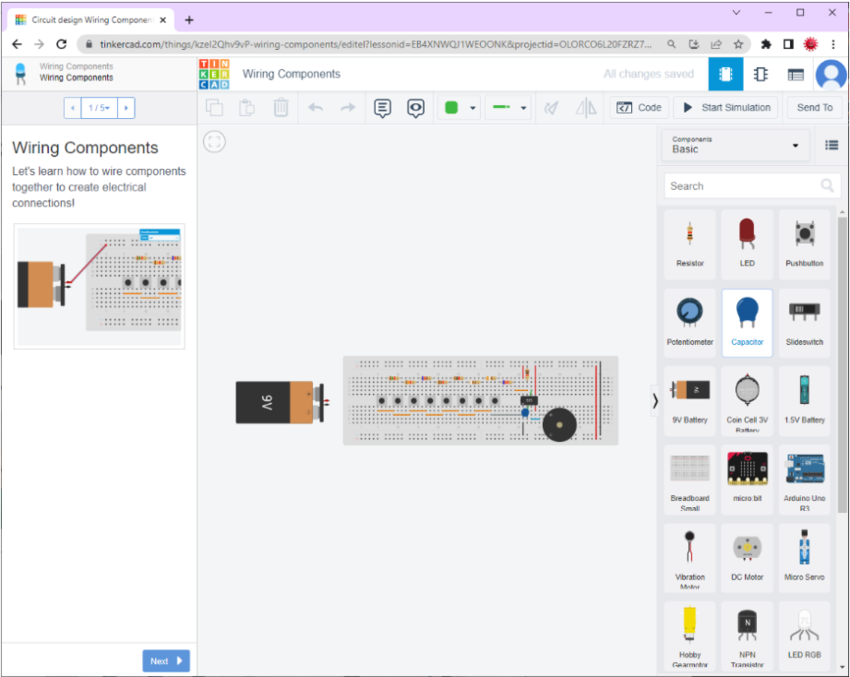
Circuits: Tinkercad includes a browser-based electronic circuit simulator supporting Arduino Uno microcontrollers, Micro:bit boards, and ATtiny chips. Users can create code using graphical CodeBlocks or text-based code, making it suitable for both beginners and advanced users.
Codeblocks: This feature introduces a visual programming approach to 3D modeling, allowing users to create designs through a block-based coding interface.
File Compatibility:
Tinkercad supports importing shapes in STL and OBJ formats for 3D models and SVG for 2D shapes, which can be extruded into 3D objects. It exports models in STL or OBJ formats, ready for 3D printing. Additionally, it offers features to export 3D models to Minecraft Java Edition and design structures using Lego bricks.
Educational Integration:
Tinkercad is widely used in educational settings to teach students the basics of 3D design and electronics. Its intuitive interface and comprehensive tutorials make it accessible for learners of all ages.









Reviews
Clear filtersThere are no reviews yet.